2015 Toyota Tacoma Owner’s Manual — Other interior features
Interior and exterior features
Sun visors
 Type A
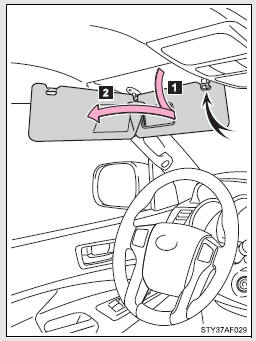
 Forward position: Flip down.
 Side position: Flip down, unhook, and swing to the side.
 Type B
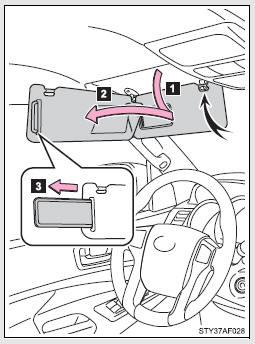
 Forward position: Flip down.
 Side position: Flip down, unhook, and swing to the side.
 Side extender: Place in side position, then slide backwards.
Vanity mirrors
 Vehicles without vanity light
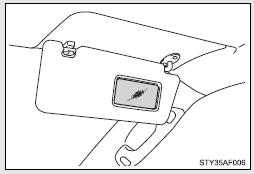
 Vehicles with vanity light
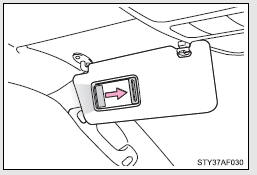
Slide the cover.
The light turns on when the cover is opened.
Clock
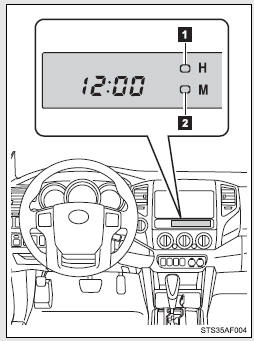
 Adjusts the hours
 Adjusts the minutes
■The clock is displayed when
The engine switch is in the ACC or ON position.
■When disconnecting and reconnecting battery terminals
The time display will automatically be set to 1:00.
Power outlets (12 VDC)
Please use as a power supply for electronic goods that use less than 12 VDC/10 A (power consumption of 120 W).
When using electronic goods, make sure that the power consumption of all the connected power outlets is less than 120 W.
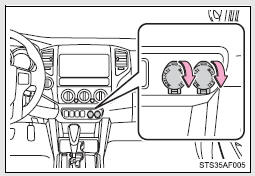
■The power outlets can be used when
The engine switch is in the ACC or ON position.
NOTICE
■To avoid damaging the power outlets
Close the power outlets lid when not in use.
Foreign objects or liquids that enter the power outlets may cause a short circuit.
■To prevent the battery from being discharged
Do not use the power outlets longer than necessary when the engine is not running.
Power outlet (120 VAC)∗
The power outlet can be used for electrical appliances.
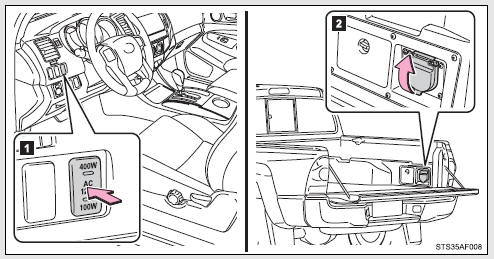
 Main switch
To use the power outlet, turn on the main switch.
The power supply starts a few seconds after the main switch is pressed.
 Power outlet socket
Maximum available capacity of the power outlet
■ While the vehicle is being driven
The maximum capacity of the power outlet is always 120 VAC/100 W.
■ When the vehicle is stationary
The maximum capacity of the power outlet varies depending on the following conditions.
● The maximum capacity is 120 VAC/400 W when the following condition applies: • The shift lever is in P or N. (automatic transmission)
• The shift lever is in N and the clutch pedal is not depressed.
(manual transmission) A maximum capacity of 400W can only be restored by turning the power outlet main switch off and then on again under condition described above.
● The maximum capacity is 120 VAC/100 W when the following condition applies: • The shift lever is moved to any positions other than P and N.
(automatic transmission) • The clutch pedal is depressed. (manual transmission)
■The power outlet can be used when
The engine is started.
■The indicator light changes according the maximum available capacity, as follows:
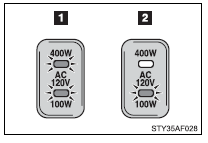
 Indicates 120 VAC/400 W
 Indicates 120 VAC/100 W
■When the power outlet is in operation
The sound of the cooling fan may be heard from the front console box. This is normal and does not indicate a malfunction.
■If the engine is started with the power outlet main switch on
The maximum capacity of the power supply may decrease to below the standard, or may be cut off completely, even when the vehicle is stationary.
■The protection circuit may be activated to cut the power supply if any of the following conditions apply:
●The engine is started with the power outlet main switch on.
●Use of electrical appliances exceeding the maximum capacity is attempted.
A sound may be heard when the protection circuit is activated.
This is normal and does not indicate a malfunction.
●Electrical appliances, which consume power exceeding 100 W, have been used continuously for a long time period.
●The total power usage by all electrical features (headlights, air conditioning, etc.) has exceeded the total vehicle maximum for an extended period of time.
■If the protection circuit is activated and the power supply is cut, conduct the following procedure:
 Park the vehicle in a safe place, and then securely apply the parking brake.
 Check and ensure the following conditions: •The shift lever is in P or N. (automatic transmission) •The shift lever is in N and the clutch pedal is not depressed.
(manual transmission)
 Make sure that the power consumption of the electric appliance is within the maximum capacity of the power outlet and the appliance is not broken.
 Press the power outlet main switch again.
When the cabin temperature is high, open the windows to cool the temperature down. Once it reaches the normal temperature, turn the power outlet main switch on again.
If the power supply is not resumed even after performing the above procedure, have the vehicle inspected by a Toyota dealer.
CAUTION
■Using a power outlet
Observe the following precautions to reduce the risk of injury.
●Use of the power outlet when it is wet with rain, drinks water or snow may result in electrical shocks and is extremely dangerous. The power outlet must be thoroughly dried before use.
●Do not allow children to use or play with the power outlet.
●Be careful not to get any part of your body caught in the power outlet lid.
●When using electrical appliances, strictly follow any cautions and notices written on their labels and in the manufacturers’ instruction manuals.
●Do not modify, disassemble or repair the power outlet or its inverter, in any way. Doing so may result in unexpected malfunctions or accidents, which could cause serious damage or injuries. Contact a Toyota dealer for any necessary repairs.
■To prevent injuries and accidents, securely fix all electric appliances before use and do not use any appliances that may do any of the following:
●Distract the driver while driving, or hamper safe driving.
●Result in a fire or burn injuries due to the appliance rolling, falling or overheating while driving.
●Emit steam, while the windows of the cabin are closed.
■To prevent unexpected accidents, such as electric shocks, do not perform any of the following
●Using the power outlet for electric heaters while sleeping.
●Contaminating the power outlet with liquid substances or mud.
●Handling electrical appliance plugs at the power outlet with wet hands or feet.
●Inserting foreign objects into the power outlet.
●Using malfunctioning electric appliances.
●Inserting inappropriate or badly fitting plugs into the power outlet.
NOTICE
■To avoid damaging the power outlet and the plug
●Close the power outlet lid when not in use.
●Foreign objects or liquids that enter the power outlet may cause a short circuit.
●Do not use plug adaptors to connect too many plugs to the power outlet.
●After inserting a plug, gently close the power outlet lid.
■To prevent the fuse from being blown
Do not use a 120 VAC appliance that requires more than maximum capacity.
If a 120 VAC appliance that consumes more than maximum capacity is used, the protection circuit will cut the power supply.
■Appliances that may not operate properly (120 VAC)
The following 120 VAC appliances may not operate even if their power consumption is under maximum capacity.
●Appliances with high initial peak wattage
●Measuring devices that process precise data
●Other appliances that require an extremely stable power supply
■To prevent the battery from being discharged
Turn off all the vehicle’s electronic equipment and accessories, such as the headlights and air conditioning, when electrical appliances that consume in excess of 100W are used continuously for long periods of time.
■To prevent any damage caused by heat
●Do not use any electrical appliances that give off intense heat such as toasters, in any locations including the internal or external trim, seats and deck.
●Do not use any electrical appliances, which are easily affected by vibration or heat, inside the vehicle.
Vibration while driving, or the heat of the sun while parking, may result in damage to those electrical appliances.
NOTICE
■If any electrical appliances are to be used while driving
Securely fasten both the appliances and their cables to prevent them from falling or getting caught any of the power train components.
■If the power outlet is loose when an electrical appliance plug is connected
Replace the outlet.
Contact a Toyota dealer for any necessary replacements.
■If the power outlet gets dirty
Turn the main switch off and use a soft, clean cloth to wipe it gently.
Do not use any cleansing materials, such as organic solvents, wax, or compound cleaners, as these may damage the power outlet or cause it to malfunction.
Seat heaters
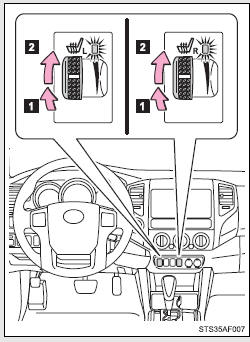
 On
On
The indicator comes on.
 Adjusts the seat temperature.
The further you turn the dial upward, the warmer the seat becomes.
■The seat heaters can be used when
The engine switch is in the ON position.
■When not in use
Turn the dial fully downward. The indicator turns off.
CAUTION
■Burns
●Use caution when seating the following persons in a seat with the seat heater on to avoid the possibility of burns: • Babies, small children, the elderly, the sick and the physically challenged
• Persons with sensitive skin
• Persons who are fatigued
• Persons who have taken alcohol or drugs that induce sleep (sleeping drugs, cold remedies, etc.)
●Do not cover the seat with anything when using the seat heater.
Using the seat heater with a blanket or cushion increases the temperature of the seat and may lead to overheating.
●Do not use the seat heater more than necessary.
Doing so may cause minor burns or overheating.
NOTICE
■To prevent seat heater damage
Do not put heavy objects that have an uneven surface on the seat and do not stick sharp objects (needles, nails, etc.) into the seat.
■To prevent battery discharge
Turn the seat heaters off when the engine is not running.
Seatback table
Front passenger’s seatback can be used as a temporary table only when the vehicle is stopped.
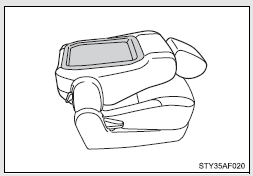
Fold down the front passenger’s seat to use the seatback table.
CAUTION
■Caution while driving
Observe the following precautions to avoid death or serious injury.
●Do not set up the seatback table.
●Do not sit on or place anything on the seatback table.
NOTICE
■To prevent damage to the seatback table
Do not put heavy loads on the table.
Floor mat
Use only floor mats designed specifically for vehicles of the same model and model year as your vehicle. Fix them securely in place onto the carpet.
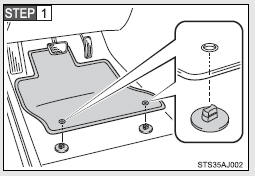
Insert the retaining hooks (clips) into the floor mat eyelets.
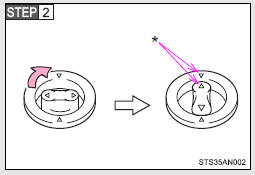
Turn the upper knob of each retaining hook (clip) to secure the floor mats in place.
*: Always align the  marks.
The shape of the retaining hooks (clips) may differ from that shown in the illustration.
CAUTION
Observe the following precautions.
Failure to do so may cause the driver’s floor mat to slip, possibly interfering with the pedals while driving. An unexpectedly high speed may result or it may become difficult to stop the vehicle, leading to a serious accident.
■When installing the driver’s floor mat
●Do not use floor mats designed for other models or different model year vehicles, even if they are Toyota Genuine floor mats.
●Only use floor mats designed for the driver’s seat.
●Always install the floor mat securely using the retaining hooks (clips) provided.
●Do not use two or more floor mats on top of each other.
●Do not place the floor mat bottom-side up or upside-down.
■Before driving
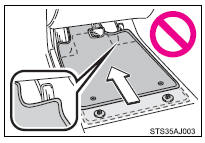
●Check that the floor mat is securely fixed in the correct place with all the provided retaining hooks (clips). Be especially careful to perform this check after cleaning the floor.
●With the engine stopped and the shift lever in P (automatic transmission) or N (manual transmission), fully depress each pedal to the floor to make sure it does not interfere with the floor mat.
Luggage compartment features
 Behind the rear seat (Double Cab models only)
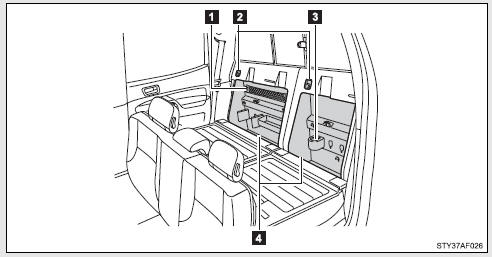
1.Cargo net hooks (vehicles with sub woofer)
2.
Grocery bag hooks
3.Flashlight holder
4.Storage boxes
 Deck
Deck
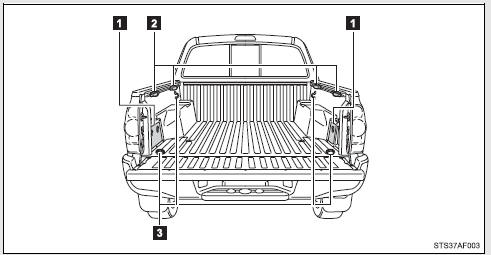
1. Auxiliary boxes
2. Tie-down cleats
3. Deck hooks
Auxiliary boxes
 Left side
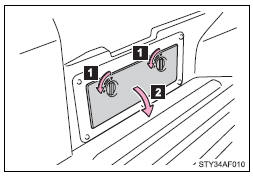
1. Turn the knob counterclockwise.
2. Open the lid.
 Right side (vehicles without 120V power outlet)
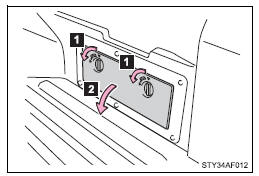
1. Turn the knob counterclockwise.
2. Open the lid.
Right side (vehicles with 120V power outlet)
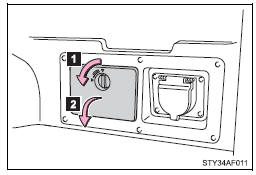
1. Turn the knob counterclockwise.
2. Open the lid.
CAUTION
■Caution while driving
Keep the auxiliary boxes closed and locked.
Injuries may result in the event of an accident or sudden braking.
Deck hooks
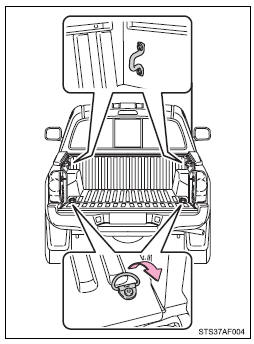
Deck hooks are provided for securing loose items.
CAUTION
■When not in use
Keep the deck hooks folded.
Tie-down cleats
The deck rail system enables you to insert and move tie-down cleats to their best location along deck rails to secure a load.
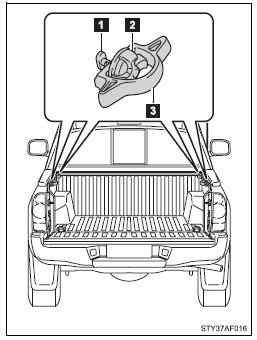
1. Locking plate
2. Thumb wheel
3. Tie-down cleat
■ Installing the tie-down cleat
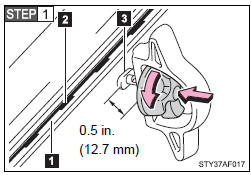
Loosen the thumb wheel in a counterclockwise motion, and depress the wheel so that the locking plate maintains 0.5 in.
(12.7 mm) gap.
1. Deck rail
2. Detent
3. Locking plate
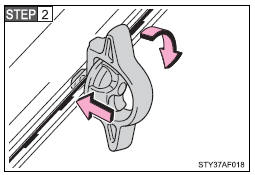
Insert the locking plate into the deck rail, rotate the tie-down cleat 90°, and release the thumb wheel.
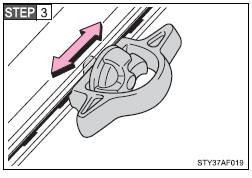
Slide the cleat to the closest detent in the rail system. You will feel that the locking plate snaps into a detent.
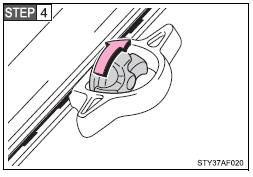
Tighten the thumb wheel in a clockwise motion until the clutch mechanism ratchets.
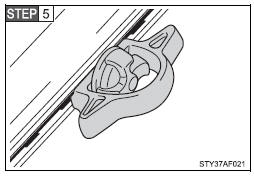
Check the tie-down cleat to confirm that it is locked into a detent and securely mounted to the deck rail system.
CAUTION
■Tie-down cleat precautions
●Properly install and tighten the tie-down cleats into the deck rail system.
Failure to properly install and tighten the tie-down cleats can cause cargo to become unsecured. Unsecured cargo can cause injury when the vehicle is in motion.
●Properly secure all cargo to prevent shifting or sliding during driving.
Failure to properly secure cargo can cause injury when the vehicle is in motion.
●Applying loads at an angle to the tie-down cleat greater than 45° or loads greater than 220 lb. (100 kg) may cause damage to the deck, deck rail system, tie-down cleat and/or the cargo.
●Do not exceed a total tensile load of 440 lb. (200 kg) per deck rail.
●Do not install more than the following number of tie-down cleats per deck rail: • Side rail:
Short deck—Max. 3 locations
Long deck—Max. 4 locations
• Headboard rail: Max. 3 locations
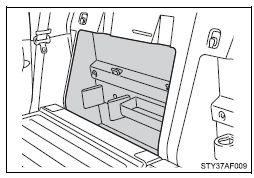
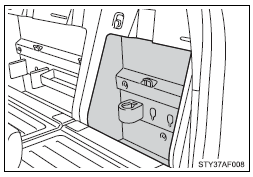
Storage boxes (Double Cab models only)
Storage box is designed to place things like bottles.
 Right side (vehicles without sub woofer)
 Left side
■Removing the separator
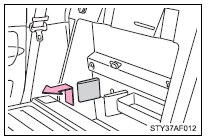
Remove the separator.
It can be installed in various positions as required.
Flashlight holder (Double Cab models only)
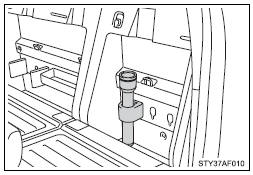
Flashlight holder is designed to hold the flashlight securely.
■Removing the flashlight holder
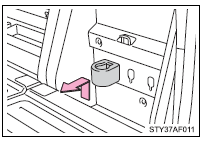
Remove the flashlight holder.
It can be installed in various positions as required.
Grocery bag hooks ( Double Cab models only)
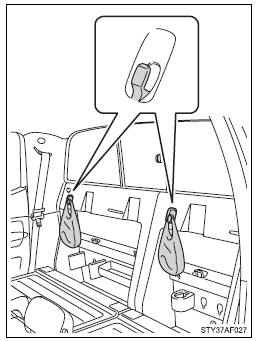
Grocery bag hook is designed to hang things like grocery bag.
NOTICE
■Grocery bag hook weight capacity
Do not hang any object heavier than 7 lb. (3 kg) on the grocery bag hooks.
Cargo net hooks (Double Cab models with sub woofer)
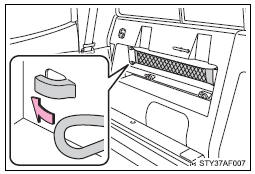
Cargo net hooks are designed to hang the factory-supplied cargo net.
NOTICE
■To prevent damage to the cargo net hook
Do not hang items other than the cargo net.
Garage door opener
The garage door opener can be trained to operate garage doors, gates, entry doors, door locks, home lighting systems, security systems, and other devices.
The garage door opener (HomeLink® Universal Transceiver) is manufactured under license from HomeLink®.
Training the HomeLink® (for U.S. owners)
The HomeLink® compatible transceiver in your vehicle has 3 buttons which can be trained to operate 3 different devices. Refer to the training method below appropriate for the device.
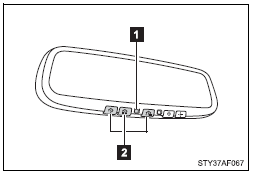
1. Indicator light
2. Buttons
■ Training the HomeLink®
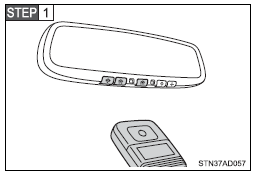
Point the remote control transmitter for the device 1 to 3 in. (25 to 75 mm) from the HomeLink® control buttons.
Keep the indicator on the HomeLink® in view while training.
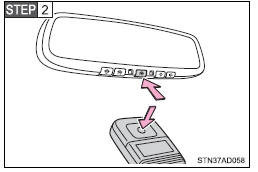
Press and hold down one of the buttons on the HomeLink® and the button on the transmitter.
When the indicator on the HomeLink® changes from a slow to a rapid flash, you can release both buttons.
If the HomeLink® indicator comes on but does not flash, or flashes rapidly for 2 seconds and remains lit, the HomeLink® button is already trained. Use the other buttons or follow the “Retraining a HomeLink® button” instructions.
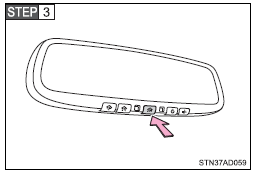
Test the operation of the HomeLink® by pressing the newly trained button.
If training a garage door opener, check to see if the garage door opens and closes. If the garage door does not operate, see if your garage transmitter is of the Rolling Code type. Press and hold the trained HomeLink® button. The garage door has the rolling code feature if the indicator (on the HomeLink®) flashes rapidly for 2 seconds and then remains lit. If your transmitter is the Rolling Code type, proceed to the heading “Training a rolling code system”.
 Repeat the steps above to train another device for each of the remaining HomeLink® buttons.
■ Training a Rolling Code system (for U.S. owners)
If your device is Rolling Code equipped, follow the steps under the heading “Training the HomeLink®” before proceeding with the steps listed below.
 Locate the learn button on the ceiling mounted garage door opener motor. The exact location and color of the button may vary by brand of garage door opener.
Refer to the operation manual supplied with the garage door opener for the location of the learning button.
 Press the learning button.
Following this step, you have 30 seconds in which to initiate step 3 below.
 Press and hold the vehicle’s trained HomeLink® button for 2 seconds and release it. Repeat this step once again. The garage door may open.
If the garage door opens, the training process is complete. If the door does not open, press and release the button a third time. This third press and release will complete the training process by opening the garage door.
The ceiling mounted garage door opener motor should now recognize the HomeLink® transceiver and operate the garage door.
 Repeat the steps above to train another rolling code system for any of the remaining HomeLink® buttons.
■ Training an entry gate (for U.S. owners)/Training a device in the Canadian market
 Place the remote control transmitter 1 to 3 in. (25 to 75 mm) away from the HomeLink® buttons
Keep the HomeLink® indicator light in view while training.
 Press and hold the selected HomeLink® button.
 Repeatedly press and release (cycle) one of the buttons on the remote control transmitter for 2 seconds at a time until
  is completed.
When the HomeLink® indicator light starts to flash rapidly, release the buttons on the HomeLink®.
 When the HomeLink® indicator light starts to flash rapidly, release the buttons on the HomeLink®.
 Repeat the steps above to train another device for any of the remaining HomeLink® buttons.
■ Training other devices
To train other devices such as home security systems, home door locks and lighting, contact your Toyota dealer for assistance.
■ Retraining a button
The individual HomeLink® buttons cannot be erased but can be retrained. To retrain a button, follow the “Retraining a HomeLink® button” instructions.
Operating HomeLink®
Press the appropriate HomeLink® button. The HomeLink® indicator light should come on.
The HomeLink® compatible transceiver in your vehicle continues to send a signal for up to 20 seconds as long as the button is pressed.
Retraining a HomeLink® button
Press and hold the desired HomeLink® button. After 20 seconds, the HomeLink® indicator light will start flashing slowly. Keep pressing the HomeLink® button and then follow the “Training the HomeLink® (for U.S. owners)” instructions.
Erasing the entire HomeLink® memory (all three programs)
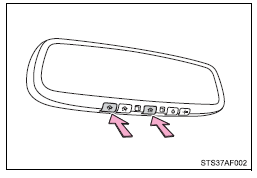
Press and hold down the 2 outside buttons for 10 seconds until the indicator flashes.
If you sell your vehicle, be sure to erase the programs stored in the HomeLink® memory.
■Before training
●Install a new battery in the remote control transmitter.
●The battery side of the remote control transmitter must be pointed away from the HomeLink® button.
■Certification for the garage door opener
 For vehicles sold in the U.S.A.
FCC ID: NZLWZLHL4
NOTE: This device complies with part 15 of the FCC Rules.
Operation is subject to the following two conditions: (1) This device may not cause harmful interference, and (2) this device must accept any interference received, including interference that may cause undesired operation.
FCC WARNING: Changes or modifications not expressly approved by the party responsible for compliance could void the user’s authority to operate the equipment.
 For vehicles sold in Canada
NOTE: This device complies with Industry Canada licence-exempt RSS standard( s). Operation is subject to the following two conditions: (1) this device may not cause interference, and (2) this device must accept any interference, including interference that may cause undesired operation of the device.
■When support is necessary
Visit on the web at www.homelink.com or call 1-800-355-3515.
CAUTION
■When training a garage door or other remote control devices
The garage door or other devices may operate, so ensure people and objects are out of danger to prevent potential harm.
■Conforming to federal safety standards
Do not use the HomeLink® compatible transceiver with any garage door opener or device that lacks safety stop and reverse features as required by federal safety standards.
This includes any garage door that cannot detect an interfering object. A door or device without these features increases the risk of death or serious injury.
Compass (vehicles with auto anti-glare inside rear view mirror)
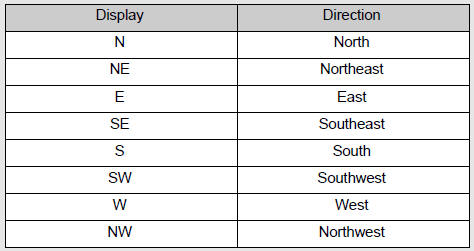
The compass on the inside rear view mirror indicates the direction in which the vehicle is heading.
■ Operation
 Type A
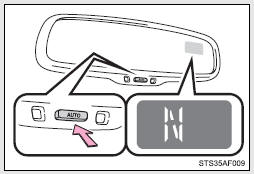
To turn the compass on or off, press the button.
 Type B
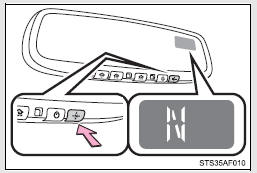
■ Displays and directions
Calibrating the compass
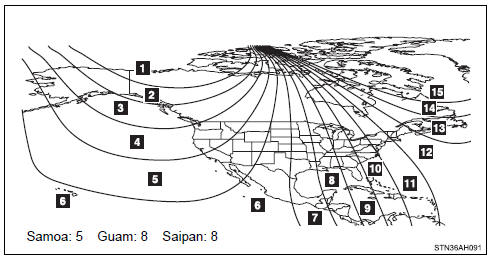
The direction display deviates from the true direction determined by the earth’s magnetic field. The amount of deviation varies depending on the geographic position of the vehicle.
If you cross over one of the map boundaries shown in the illustration, the compass will deviate.
To obtain higher precision or perfect calibration, refer to “Deviation calibration”.
■ Deviation calibration
 Stop the vehicle where it is safe to drive in a circle.
 Press the button until a number (1 to 15) appears on the compass display.
 Type A
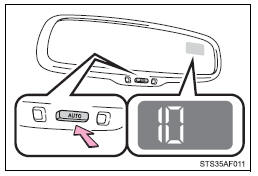
Type B
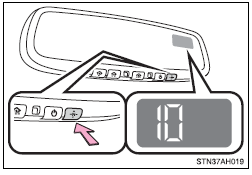
 Press the button, and referring to the map above, select the number of the zone where you are.
If the direction is displayed several seconds after adjustment, the calibration is complete.
■ Circling calibration
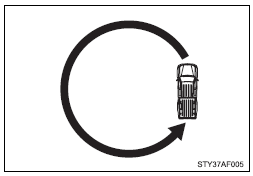
When “C” appears on the display, drive the vehicle at 5 mph (8 km/h) or less in a circle until a direction is displayed.
If there is not enough space to drive in a circle, drive around the block until the direction is displayed.
■Conditions unfavorable to correct operation
The compass may not show the correct direction in the following conditions: ●The vehicle is stopped immediately after turning.
●The vehicle is on an inclined surface.
●The vehicle is in a place where the earth’s magnetic field is subject to interference by artificial magnetic fields (underground car park/parking lot, under a steel tower, between buildings, roof car park/parking lot, near an intersection, near a large vehicle, etc.).
●The vehicle has become magnetized.
(There is a magnet or metal object near the inside rear view mirror.) ●The battery has been disconnected.
●A door is open.
CAUTION
■While driving the vehicle
Do not adjust the display. Adjust the display only when the vehicle is stopped.
■When doing the circling calibration
Secure a wide space, and watch out for people and vehicles in the vicinity.
Do not violate any local traffic rules while performing circling calibration.
NOTICE
■To avoid the compass malfunctions
Do not place magnets or any metal objects near the inside rear view mirror.
Doing this may cause the compass sensor to malfunction.
■When doing the circling calibration
●Do not perform a circling calibration of the compass in a place where the earth’s magnetic field is subject to interference by artificial magnetic fields.
●During calibration, do not operate electric systems (power windows, etc.) as they may interfere with the calibration.
Stored owner’s manualImported HTML from the shared Autotk manuals tables. Not an official Toyota site.